Know when a show you watched is coming back
You watch season 1, it is great, and then life happens. By the time season 2 arrives, most people only hear about it by accident, or a year late.
Watchlist Boosted keeps an eye on every series you have finished and tells you when the next season is coming, from the day it is announced to the week it starts. On your dashboard, and by email if you want it, so you can love a show without that worry in the back of your mind about missing the next season.
How it works
- Mark a series watched when you finish it. Watchlist Boosted notes which season you were up to. Shows you marked watched before are covered too.
- Once a week it checks every series you have finished for a later season.
- As soon as one is listed, it goes into a New seasons row on your dashboard, however far off it is.
From announced to out
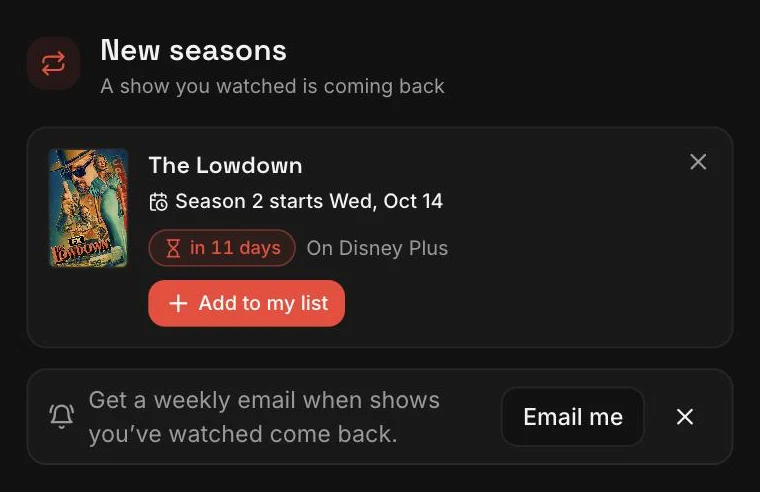
A new season can be announced months before anyone knows the date. So each card moves through the same stages: “Season 2 announced, no date yet”, then a countdown once there is a date (“in 5 months”, “in 3 weeks”, “tomorrow”), then “Season 2 is out”.
Nothing waits until it is close. If it has been announced, it is on the row, so there is no wondering whether you missed it.
New seasons
4 shows you watched are coming back, 1 out now
The Night Desk
Season 2 is out
On NetflixHarbour Lights
Season 3 starts Friday
in 5 daysOn your listSecond Shift
Season 2 starts Thu, 11 Mar
in 5 monthsRidgeback
Season 4 announced
No date yet
What you can do with each one
- Start season 2, once it is out. The show moves into your Watching row at season 2, ready for the first episode.
- Add to my list. It goes back on your watchlist marked “Season 2 in 3 weeks”, and stays on the row counting down until you start it.
- Not for me. That season is hidden for good. If there is ever a season after it, you will still hear about that one.
Coming back for a new season does not undo the old one. Season 1 still counts as watched in your history, in the year you watched it.
3 shows you finished are coming back
Starting this week
Harbour Lights: Season 3 starts Friday 9 October
New dates
Ridgeback: Season 4 now starts Thursday 4 February, not Thursday 14 January
Dates announced
Second Shift: Season 2 starts Thursday 11 March (in 5 months)
The weekly email
This is the part that lets you stop keeping track. Love a series, mark it watched when you finish, and let go of that small worry about missing what comes next. If it comes back, the email tells you.
Turn it on and you get one email on Thursdays, only when there is something to say. It covers three things, each once:
- A date announced, with how long to wait, while it is still something to look forward to.
- A date that moved: “now starts 4 February, not 14 January”.
- The week it starts, as a reminder, so a date you heard about months ago is not forgotten.
It is off until you turn it on, from Settings or with one tap the first time the New seasons row appears.
Where the dates come from
Season listings and dates come from TMDB, the community-run film and TV database. A season shows up here once TMDB lists it, and a date once TMDB has one. Dates do move, which is why a changed date gets its own line in the email rather than being quietly swapped.
Shows that have ended are still checked once a month, in case one is brought back. Shows in your Graveyard are left out.
Questions
- Do I need to set anything up?
- No. Mark a series watched when you finish it, or import a list that already has your watched shows, and it is covered.
- How soon will I hear about a new season?
- Within a week of it being listed on TMDB, the film and TV database the site uses. It shows on your dashboard straight away, and in the Thursday email if you have it on.
- What about shows I gave up on?
- Shows in your Graveyard are left out. If you gave up on it, a new season is not news.
- Can I turn the email off?
- It is off until you turn it on, and you can turn it off again in Settings or from any email.
- Does it cost anything?
- No. Watchlist Boosted is free, with no paywall.
Start with the shows you have watched
Bring in your watchlist and watched history from Netflix, Letterboxd, IMDb or TV Time, and the next seasons come to you. Free, with no paywall.