How to export your Netflix watchlist
Netflix has no export button. Here is how to export your Netflix My List as a JSON file with a free Chrome extension, then sort and filter it properly.
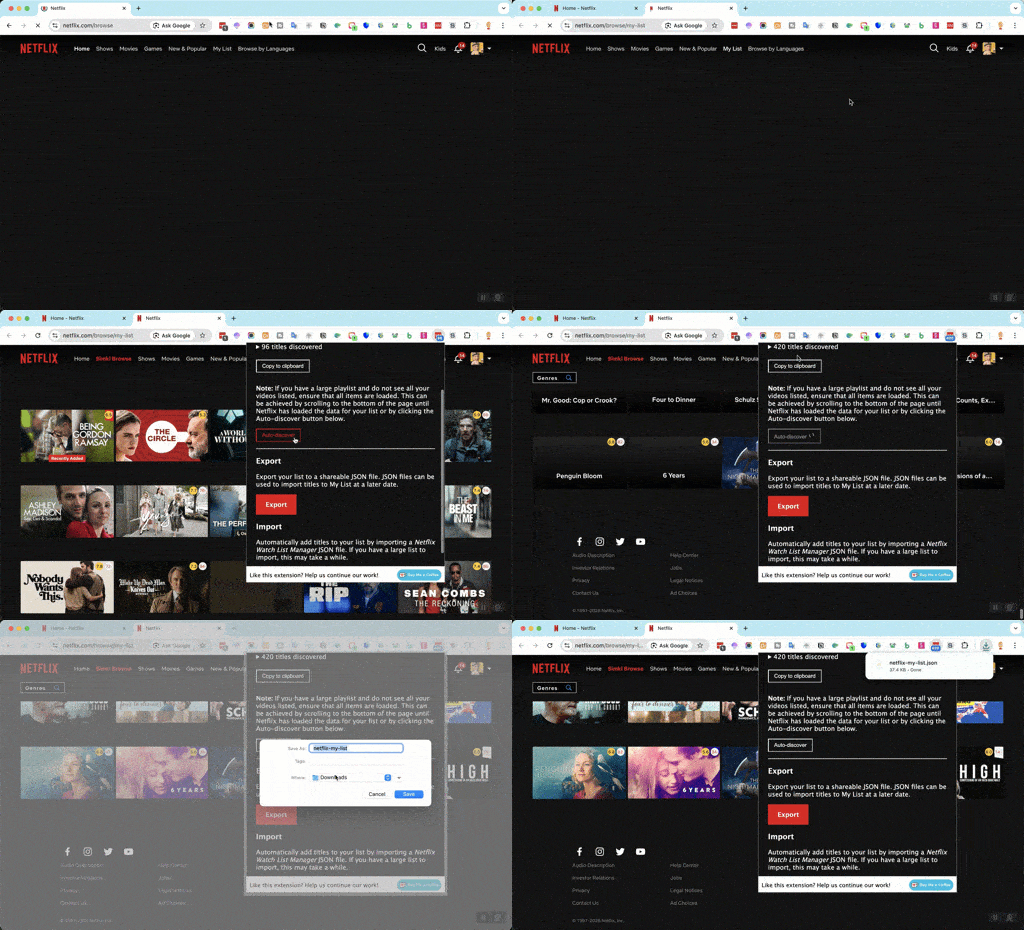
Netflix has no export of its own, so this goes through a free Chrome extension that reads your My List page and saves it as a JSON file. It takes about two minutes.
- Install Netflix Watch List Manager from the Chrome Web Store.
- Open netflix.com/browse/my-list while signed in to Netflix.
- Click the extension's icon in the toolbar and choose Export. Save the JSON file.
- Sign in, open Settings → Import Data, and drop the file into the box. Titles you already have are skipped, so re-importing later is safe.
The file includes each title's Netflix ID, so the app can link every title straight back to its Netflix page.
Why export your Netflix watchlist at all
Netflix removed the options to sort My List alphabetically or by the date you added a title. The only order left is "Netflix suggestions". Once the list is out of Netflix you can sort it by IMDb or Rotten Tomatoes rating, by year, by runtime, or by how long it has been sitting there, and filter by mood to pick something tonight.
What is in the export
A JSON file with the title, type and Netflix ID for everything on your list. It does not include ratings or posters; Watchlist Boosted fetches those from TMDB and OMDb after the import.
Then make the list useful
Once it is imported, sort by IMDb, TMDB or Rotten Tomatoes rating, filter by mood, note why you saved each title, and share the list with whoever you watch with. Free, with no paywall.